Keep what people can book in i-Connect: your doctors, services or batches, and the times you're open. A WhatsApp Flow then offers only what's free, books it when the customer confirms, and starts the reminders. You don't need a booking system or a server of your own.
What it does
- Lists are the choices a Flow question shows, for example your doctors or your services.
- Calendars say what can be booked and when: time slots on days of the week, how many places each slot has, and how far ahead people can book.
- Bookings are made in a WhatsApp Flow, by your team on the Bookings page, or by your own system through the API. All three count against the same places.
- A slot is never booked past its places. If two people go for the last place at the same moment, exactly one gets it.
Lists
In Bookings → Lists, create a list and add its items.
- Up to 200 items. Each item's name is at most 30 characters, which is WhatsApp's limit for a choice.
- Turn an item off to stop offering it. Bookings already made with it keep its name.
- Changes show up straight away in published Flows; you don't need to publish the Flow again.
Calendars
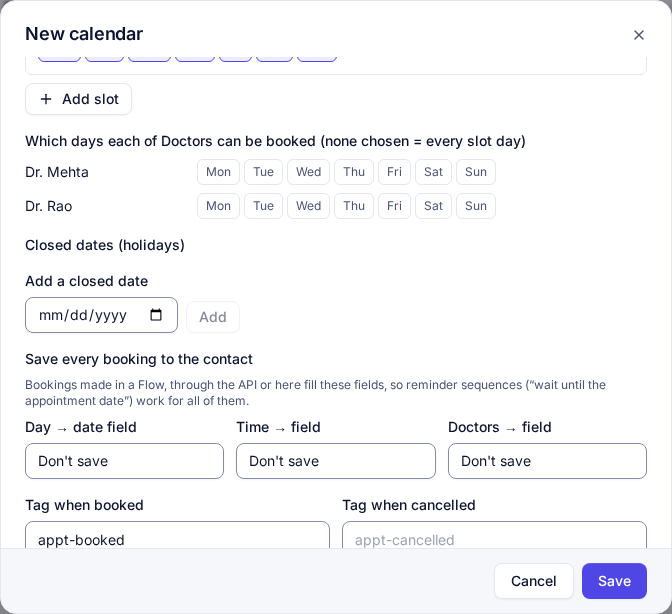
- Time slots: a name people see (for example "10 AM – 1 PM"), a start time, the days it runs and the number of places.
- Bookable days ahead (1 to 90) and a minimum notice: a slot starting sooner than that isn't offered.
- Closed dates for holidays.
- Places counted per item of a list, for example per doctor: each doctor then has their own places in every slot. You can also choose the days each doctor can be booked.
- Save every booking to the contact: the day (a date field), the time and the doctor or service. Reminder sequences read these fields, whether the booking was made in WhatsApp, by your team or through the API.
- Tags added when someone books and when a booking is cancelled. Use them to start and stop sequences.
- Times are in your organisation's time zone.
Booking in a WhatsApp Flow
In the Flow builder, each question has Options come from:
- A list: the question shows the list's items.
- Free times of a calendar: only the slots still free on the day chosen in an earlier date question (and for the doctor chosen earlier, if places are counted per doctor). This question is the booking: one per Flow, and it can't be on the first screen.
On a date question, Days offered can limit the picker to the calendar's open days: holidays, days with no slots and fully booked days can't be picked.
The slot is booked when the customer taps the last button. If someone took it a moment earlier, they stay on the screen and see "That time was just taken. Please pick another." with the times still free. Preview data in the builder shows what a customer would be offered right now.
The Bookings page
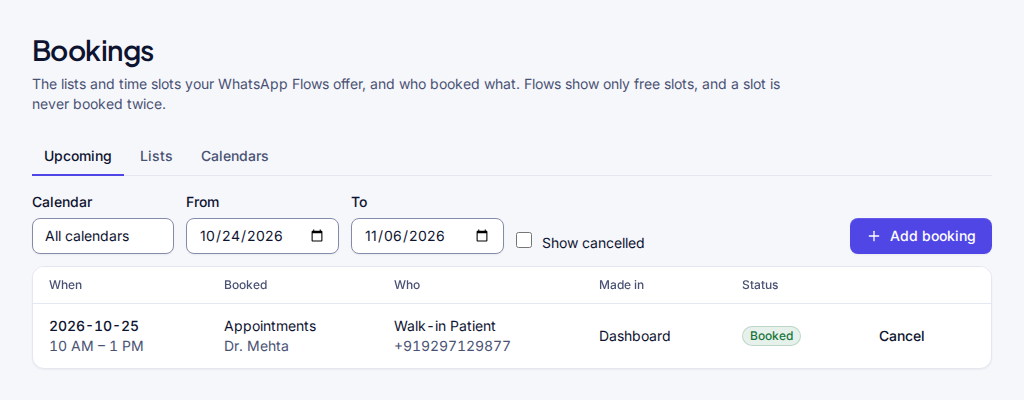
- Upcoming lists bookings by date, with who booked, for what, and where the booking was made (WhatsApp Flow, dashboard or API).
- Add booking for a walk-in or a phone call: it shows only free times, and a new phone number becomes a contact.
- Cancel frees the place. The person isn't messaged automatically; a sequence on the calendar's cancelled tag can do that.
Reminders, rescheduling and cancelling
- Start a sequence on the calendar's booked tag, and use Wait until the date field it fills, for example the evening before at 6 PM.
- Make the sequence end on the cancelled tag, so a cancelled booking gets no more reminders.
- The Cancel booking sequence step cancels the contact's next booking in a calendar and frees the place. Use it behind "Reschedule" and "Cancel" buttons: for a reschedule, send the booking Flow next.
- The step has a second exit, nothing to cancel, for when the booking is already gone, for example when someone taps Cancel right after Reschedule.
The industry kits for clinics, real estate, coaching and salons come with all of this already set up.
Who can do what
- See lists, calendars and bookings: Owners, Admins, Managers, Agents and Analysts.
- Add and cancel bookings: Owners, Admins, Managers and Agents.
- Change lists and calendars: Owners, Admins and Managers.
- Your own systems can do the same through the API with matching key scopes. See the bookings API.
Good to know
- A place is taken when the customer confirms, not while they're filling in the Flow.
- Rescheduling is a cancellation and a new booking.
- Booking Flows need to be published before you can send them, and only inside the 24-hour window, like any Flow.
Still stuck? Write to support@i-connect.world with your organisation's name and what you see on screen.